

About M-iBO Player APK
Download M-iBO Player APK — an iBO-style IPTV player for Mega OTT with MAC address activation, full EPG, catch-up & Smart TV support. Android, Firestick, Box.
App details
- Version
- Latest
- File size
- May 2026
- Requires
- Android 10.0 and above
- Updated
- May 2026
- Platform
- ANDROID
What’s new
FAQ
Q1. What is M-iBO Player? M-iBO Player is an iBO-style IPTV player application designed for Mega OTT IPTV subscribers. It uses MAC address / device key activation instead of traditional username and password login.
Q2. How does device key activation work in M-iBO Player? When you first open the app, it generates a unique device key (MAC address) for your device. You share this key with your Mega OTT IPTV provider, who activates your subscription on the server. The app then loads all your channels automatically — no manual login required.
Q3. How is M-iBO Player different from the Mega OTT Smarters app? M-iBO Player uses MAC-based device activation (like iBO Player). The Smarters-based Mega OTT app uses an activation code or username/password login. Both connect to the same Mega OTT service — the difference is the login method.
Q4. Where do I find my MAC address / device key in M-iBO Player? Open the app — the device key (MAC) is displayed on the main activation screen. Share it with your Mega OTT reseller to activate your subscription.
Q5. Can I use the same MAC on multiple devices? No. Each device has its own unique MAC address. You'll need to activate each device separately with your provider, based on your subscription plan.
Q6. Is M-iBO Player free to download? Yes. The APK is free. However, you need an active Mega OTT IPTV subscription, activated by your provider against your device key, to access content.
Q7. Does M-iBO Player work on Firestick and Android TV? Yes. M-iBO Player is fully compatible with Amazon Firestick, Fire TV, Android TV, Google TV, and Android-based set-top boxes.
Q8. What happens if I uninstall the app — will my MAC change? On most devices, the MAC address stays the same after reinstalling. On some Android boxes, however, the MAC may regenerate. If that happens, share the new device key with your provider to reactivate.
Q9. Does the app include channels or movies? No. M-iBO Player is a media player only. You must have a valid Mega OTT subscription activated by your provider.
Screenshots
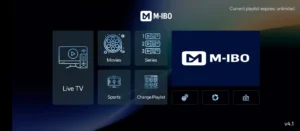
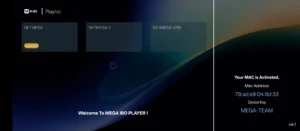
Download questions
How do I download this app?
Select Download now to open the listed download source. No form is required on this website.
What are the requirements?
The current listing specifies Android 10.0 and above for ANDROID.