

About 5G Play APK
App details
- Version
- Latest
- File size
- 56.71 MB
- Requires
- Android 10.0 and above
- Updated
- May 2026
- Platform
- ANDROID
What’s new
5G Play APK — 9Xtream-Based IPTV Player for 5GLive
5G Play is a modern, lightweight IPTV player application built on the
9Xtream engine, designed for users of the 5GLive IPTV service. With a
refreshed interface, faster login process, and smooth playback performance,
5G Play offers a cleaner alternative to traditional IPTV players. The app
is built for Android phones, Android TV, Smart TVs, Amazon Firestick, and
Android boxes.
What Makes 5G Play Different
5G Play is powered by the 9Xtream framework — a modern IPTV player engine
known for its lightweight footprint and fast performance. Unlike older
players, 9Xtream-based apps load categories quickly, switch channels with
minimal delay, and consume less device memory. This makes 5G Play a strong
choice for older Android phones, low-RAM Firesticks, and budget Android TV
boxes where heavier apps often lag.
Built for 5GLive IPTV
5G Play is optimized to connect smoothly with the 5GLive IPTV server.
Subscribers simply enter their login credentials, and the app loads Live
TV, Movies (VOD), Series, and Catch-up content within seconds. No manual
M3U setup is required — the app handles the connection automatically.
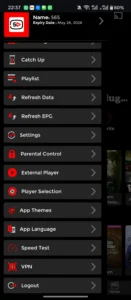
Key Capabilities
5G Play covers the full IPTV experience in a clean package:
- Live TV streaming with smooth playback
- Movies and Series with full metadata
- TV Catch-up directly from the EPG
- Full EPG (Electronic Program Guide) support
- Favorites for quick channel access
- Built-in search for Live, Movies, and Series
- Parental controls with PIN protection
- External player support (VLC, MX Player)
- Subtitle support (embedded + external)
- Multi-screen layout for TV and mobile
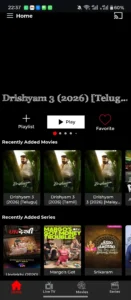
Modern 9Xtream Interface
The 9Xtream-based UI is designed around what modern IPTV users want —
clean tiles, fast scrolling, and a remote-friendly layout that works just
as well on a phone as it does on Android TV or Firestick.
Device Compatibility
- Android phones and tablets (Android 5.0 and above)
- Android TV and Google TV
- Amazon Firestick / Fire TV
- Android-based set-top boxes
- Smart TVs running Android OS
How to Install 5G Play APK
1. Download the 5G Play APK from this page.
2. Enable "Install from Unknown Sources" in your device settings.
3. Open the downloaded APK and tap Install.
4. Launch 5G Play and enter your 5GLive IPTV login credentials.
5. Start streaming.
Important Disclaimer
5G Play is a media player application only. The app does not contain, host,
or distribute any TV channels, movies, series, or other media content.
Users must provide their own 5GLive IPTV subscription credentials. We do
not endorse the streaming of copyright-protected material without
permission from the copyright holder. Users are responsible for complying
with their local laws and regulations.
Final Thoughts
If you want a lightweight, modern, and fast IPTV player for your 5GLive
subscription, 5G Play is the recommended choice. Powered by the 9Xtream
engine, it delivers smooth performance on any Android device. Download the
latest version below.
Screenshots
Download questions
How do I download this app?
Select Download now to open the listed download source. No form is required on this website.
What are the requirements?
The current listing specifies Android 10.0 and above for ANDROID.